If something happens to me
One private page with what your family would need to know.
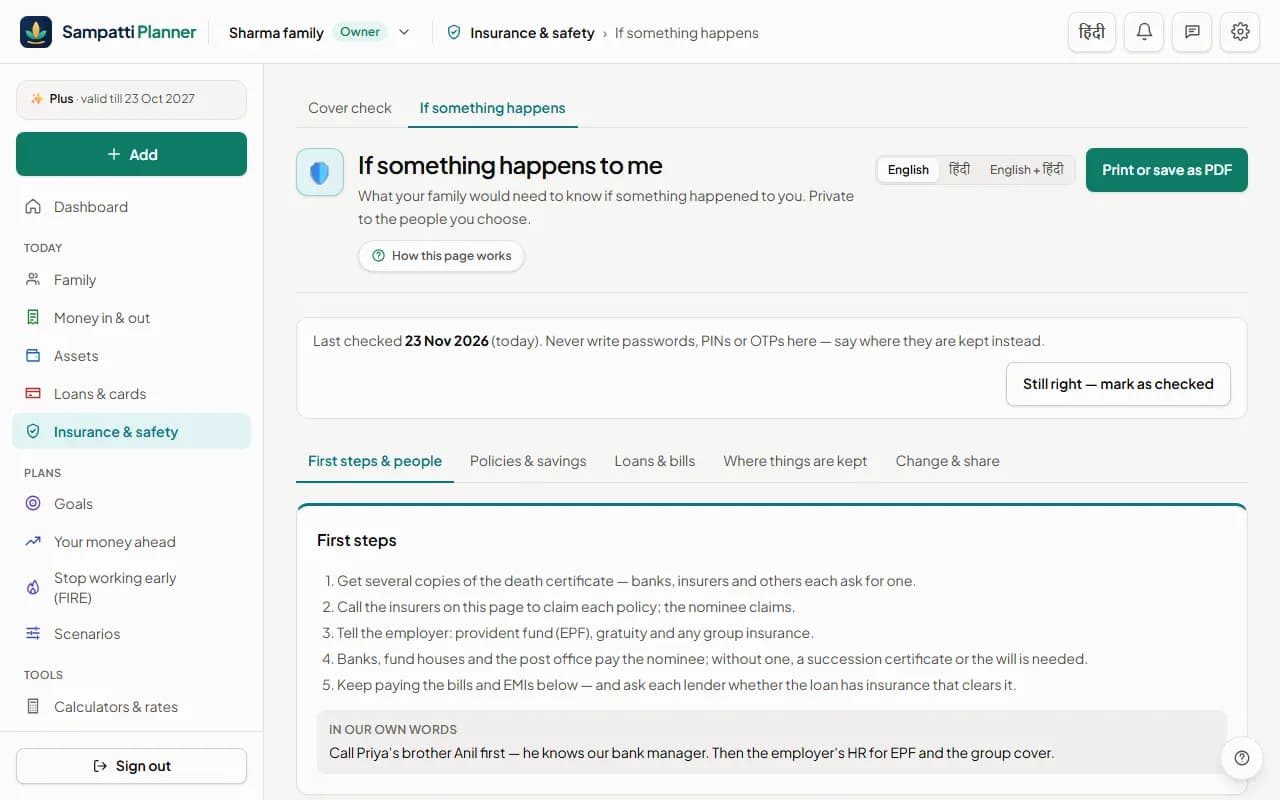
What it does
- What the family holds, and what it owes.
- Policies, nominees and who to call.
- Print it and keep it with your papers.
How it works
- Open Insurance & safety in the menu, then the “If something happens” tab. Policies, accounts, loans and bills come from your plan.
- Add the nominee on each policy (Your policies), account and fund (Assets); the page lists any without one.
- Write the first steps, where documents, the will and the locker key are kept — never passwords, PINs or OTPs (the page refuses them).
- The page is in tabs (first steps and people, policies and savings, loans and bills, where things are kept); write and share from “Change & share”. Choose which family members can see it.
- Switch between English, हिंदी or English + हिंदी and press “Print or save as PDF”. Every few months, press “Still right — mark as checked”.
- Free on every plan. Outside helpers, partners and our admins never see it; it is stored encrypted.
- A nominee collects the money for the legal heirs; a will decides who they are. Have both.
- Print in Hindi, or in English with Hindi under it, so spouses or older parents can immediately understand and use the pack in an emergency.
Questions families ask
- Who can see this page?
- Only the people you allow in your household.
- Can I keep it on paper?
- Yes. It is made to be printed.