Your parents' plan too
One login opens several households, each kept separate.
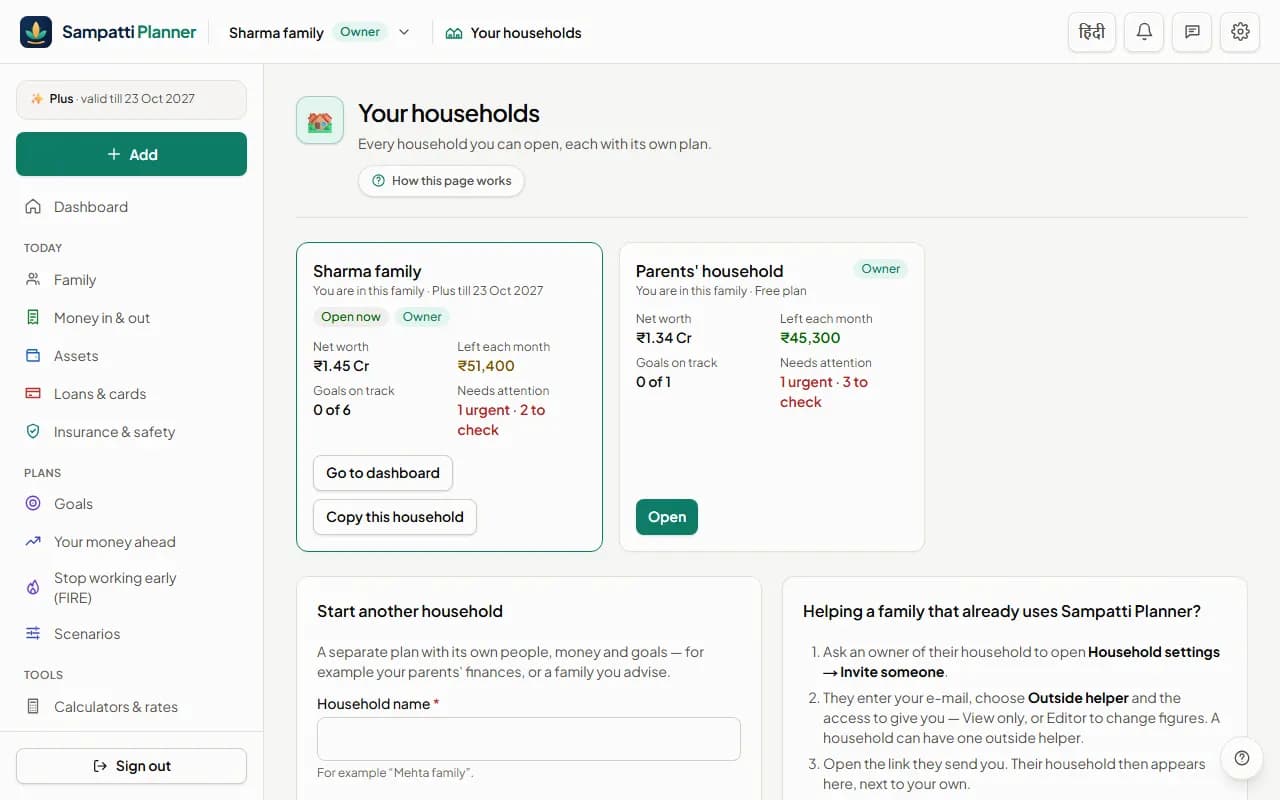
What it does
- Switch between your household and your parents'.
- Each has its own plan and its own people.
- Invite one outside helper to a household, without giving them a family profile.
How it works
- Open Your households (⚙ menu at the top) to see each one with its headline figures; press Open to switch — or pick one from the household name at the top.
- To start another household, give it a name and say whether you are part of that family.
- Helping a family that has its own household? Ask an owner to invite you as an “Outside helper”.
- A deactivated household is listed under “Deactivated households” for 30 days; any owner can press Restore.
- An outside helper sees the plan but is never part of its figures, and the family can remove them any time.
- Each household has its own plan and billing.
- An owner can start a new household from this one with Copy this household.
Questions families ask
- Are the households kept apart?
- Yes. Each has its own figures and its own access.
- Can a family member help me manage it?
- Yes. You choose who has access to each household.
- Can I start a new household from one I already have?
- Yes. An owner can copy a household: tick the family members, money, goals and scenarios to copy, and rename people in the copy. The original does not change.