Your family's net worth on one screen
What you own and owe, what is left each month, and what needs attention.
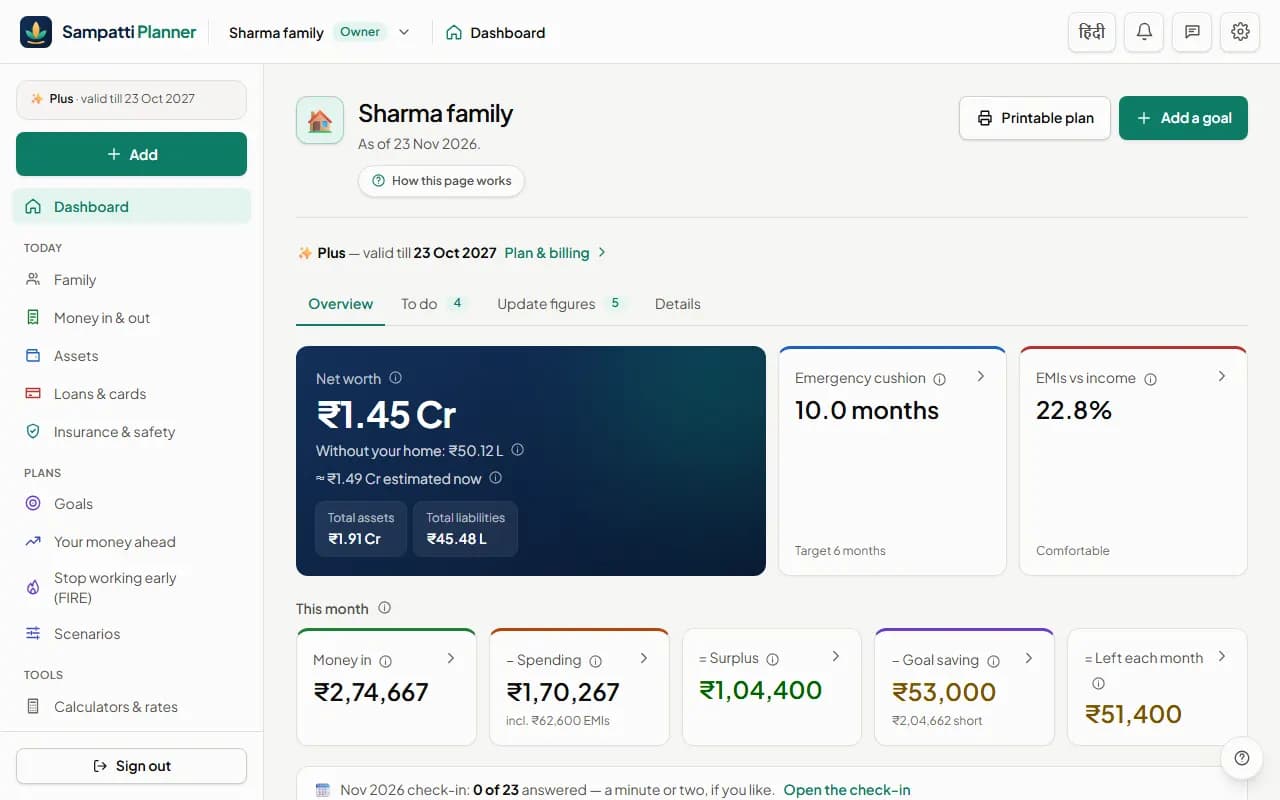
What it does
- Net worth across savings, EPF, property and loans.
- What is left each month after spending and EMIs.
- Where your take-home goes, as shares of what comes in.
- How long your emergency cushion would last.
How it works
- Overview: net worth (and “Without your home” once you tick the home you live in), how many months your ready money would last (Emergency cushion), how much of your income goes on EMIs, and This month.
- This month adds up left to right: Money in − Spending = Surplus; Surplus − Goal saving = Left each month (green, yellow or red).
- To do (with a count): Risks & checks, most serious first, each with a link to fix it; goals furthest from target; money that frees up.
- Update figures (with a count): type today's amount and press “Save new amount”, or press “Still right” — either counts as checked today.
- Details: charts, ready money, where your take-home goes (This month as shares of Money in), insurance, asset mix, net-worth history, dependents and one-off items.
- The bar at the top shows your household and the screen you are on; 🔔 💬 ⚙ sit on its right. Tap any figure to open the screen behind it.
- Deal with the first red item in Risks & checks before anything else.
- The bell 🔔 counts what is new; opening it clears the count. Delete with ×, tick several for “Delete selected”, or “Clear all”.
Questions families ask
- How is net worth worked out?
- Everything the household owns, less everything it owes, from the figures in your plan.
- How often do I need to update it?
- A few minutes a month is enough. The Monthly check-in is optional and walks through each figure.